

This page contains an affiliate link to Envato Market. We may earn a commission at no extra cost to you. Commission never decides our recommendations.
Buying a WordPress directory product is not just a design decision. It is a routing decision, a compatibility decision, and often a long-term maintenance decision. The strongest products in this category are the ones that can keep directory URLs stable, make slugs easy to edit, and survive the rest of the site’s stack without forcing the buyer into a fragile setup. This guide compares the best-known options through that lens. [1][2][4]
The shortlist below does not reward the loudest feature list. It rewards documentation, update activity, and practical URL control. That is especially important when a buyer wants a plugin or theme that can get the directory URL right the first time and keep it right after future updates. [1][2][5]
Best overall for URL control and directory-specific routing: Directories Pro if the buyer wants a plugin-first directory stack with an explicit FAQ for changing the directory page slug and recent fixes to URL routing. Best value for a feature-rich all-in-one directory plugin: Web 2.0 Directory if the buyer wants a broad feature set, modern routing fixes, and a plugin plus theme ecosystem. Best theme-only choice for buyers who want a bundled directory theme and are comfortable with a theme-led setup: ListPress. Avoid buying on feature lists alone; the buyer should verify permalink behavior, required companion plugins, and whether the setup can survive the site’s page builder and SEO stack without manual routing workarounds.
Use this guide ifChoose a plugin-first directory product if the buyer wants the most control over permalink structure, plans to switch themes later, or expects SEO and routing to matter more than a bundled design system.
Skip for now ifYou need hands-on performance testing, implementation support, or a guarantee that volatile marketplace details will not change.
Products in this guide
Products and permanent product links

Directories Pro - Directory plugin for WordPress
Best fit for buyers who prioritize directory slug control and recent routing maintenance.

Web 2.0 Directory plugin for WordPress
Best fit for buyers who want a broad directory platform with multilingual, SEO, import, and companion-theme support.
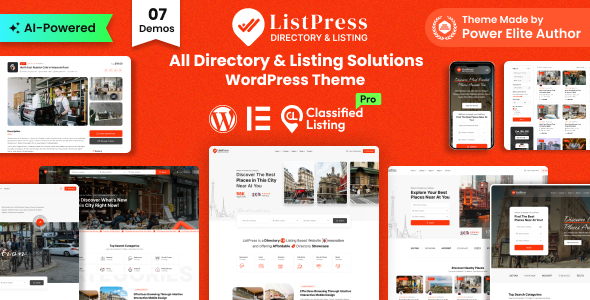
ListPress – Directory & Listing WordPress Theme
Best fit for buyers who want a modern theme-led directory site with builder support.
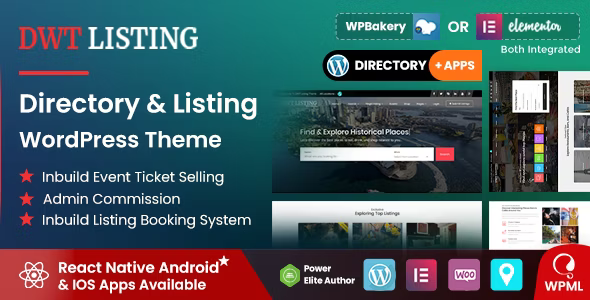
DWT - Directory & Listing WordPress Theme
Best fit for buyers who want an all-in-one directory theme and want to avoid paid plugins.

ApusListing - Directory Listing WordPress Theme
Best fit for buyers who want a conventional directory theme with monetization support and visible marketplace traction.
Quick answer and who this guide is for
This guide is for buyers who need a WordPress directory solution and care about URL behavior, not just design. The strongest purchase decision usually comes down to whether the product handles directory permalinks cleanly, works with the site’s page builder and SEO plugins, and ships a support path for future routing changes. Directories Pro directly documents how to rename the directory page slug, while its changelog shows a recent fix for taxonomy-term URL routing. Web 2.0 Directory and ListPress are more expansive products, but they solve the problem through different stacks and carry different dependency profiles. [1][2][3]
The market also splits between plugin-first and theme-first approaches. Web 2.0 Directory is a plugin with a companion theme and a fairly deep operations stack. DWT Listing and ListPress are theme-centric products, which can be attractive if the buyer wants fast visual setup, but they usually shift more responsibility onto the theme for layout, payments, and compatibility. That difference matters because directory URLs, listing pages, and search results often interact with permalinks, page builders, and SEO plugins in ways that can break if the product’s routing model is not mature. [4][5][6]
- If the main problem is getting a stable, editable WordPress directory URL, Directories Pro is the clearest fit because its support FAQ explains how to change the directory slug and its changelog includes a recent URL routing fix.
- If the goal is a broader directory platform with strong multilingual, SEO, import, and map tooling, Web 2.0 Directory is the strongest all-round plugin in this set.
- If the buyer prefers a theme-led build and wants bundled directory functionality with Elementor and Gutenberg support, ListPress is a sensible shortlist candidate.
- Theme buyers should be extra cautious about plugin dependencies, because the theme can look comprehensive while still relying on bundled or external add-ons for monetization or listing workflows.
How the options were shortlisted
The shortlist was built around products that are clearly presented as directory or listing solutions and that expose enough official marketplace information to evaluate real purchase risk. The comparison favors products with direct official item pages, visible changelog activity, and public documentation about routing, compatibility, or dependencies. For the buyer, that means the decision should not be based on visuals alone. It should be based on the stability of directory URLs, the amount of bundled functionality, and the likelihood of needing extra plugins later. [1][3][4][5]
The most relevant evidence for a URL-sensitive buyer is not a broad feature list but the product’s own routing and permalink documentation. Directories Pro provides an explicit FAQ for changing the directory page URL, and its changelog records a URL routing fix for taxonomy term pages. Web 2.0 Directory documents primary category and location URLs plus a routing-related fix for page-builder pages. Those details are more useful than marketing claims because they indicate how much of the permalink structure is actually supported by the product itself. [1][2][3]
The comparison table uses the same criteria across all shortlisted options: product type, official marketplace page, current price shown on the item page, rating or review data where visible, sales count where visible, last meaningful update signal, compatibility notes, and the main buyer limitation. Because the products vary in format, the table separates the marketplace facts from the editorial judgment. That separation matters because a theme can look feature-rich while still requiring companion plugins, while a plugin can be more flexible but require more setup discipline. [1][2][4][5]
The shortlist intentionally includes both plugin and theme approaches so the buyer can see the tradeoff. Some directory projects are easier to launch as a theme because layout and content are bundled. Others are safer as plugins because they preserve theme freedom and reduce the chance that routing or page structure gets locked into a single visual system. If URL control is a priority, the plugin path is usually the safer default. [1][2][3][4][5]
- Start by identifying whether the product is a plugin or a theme, because that determines how much control the buyer keeps over routing and design.
- Check the current item page for price, reviews, sales, last update, and supported WordPress or PHP versions before purchasing.
- For directory products, test the exact directory slug, listing URLs, taxonomy URLs, and search/filter pages on a staging install before committing.
- Confirm whether the product depends on WooCommerce, WPML, page builders, map providers, or third-party chat tools.
- Directories Pro: best for buyers who want a plugin-first directory system with clear slug control and recent routing maintenance.
- Web 2.0 Directory: best for buyers who want a dense feature set, multilingual support, SEO tooling, imports, and an included companion theme.
- ListPress: best for buyers who want a modern theme-led directory build with Elementor and Gutenberg support.
- DWT Listing: useful for buyers who want a theme-led directory site with built-in components and minimal reliance on paid plugins.
Detailed option reviews with best-for and limitations
Directories Pro is the most directly relevant product for a buyer who specifically worries about the directory URL. Its FAQ explains that the directory slug can be changed by editing the page slug and then resaving the plugin settings. Its changelog also shows a fix for URL routing on taxonomy-term pages in late August 2026. That combination makes it easier to trust the product’s permalink story than a directory tool that never addresses routing in public documentation. [1][2]
The limitation is that the official material consulted here does not show a current price in the captured page text, so the buyer should verify the live checkout price on the item page before purchase. Another limitation is that a routing FAQ is not the same thing as a full compatibility guarantee. The buyer should still test the plugin on the exact WordPress stack, especially if using a page builder, multilingual plugin, or SEO suite. [1]
Web 2.0 Directory is the most expansive plugin in this set. The official page lists WordPress 6.0+ and PHP 7.4+ requirements, plus WooCommerce only for paid listings. It also describes multilingual support, SEO options, React front end, a setup wizard, diagnostics, migration tools, and a companion theme. That breadth is valuable for larger projects, but it also means the buyer should be ready to manage more moving parts than with a simpler theme. [2]
The limitation is that a product with many integrated systems can be powerful but less forgiving if the buyer wants a minimalist install. If the project only needs a basic directory and stable URLs, the extra feature depth may be more than necessary. [2]
ListPress is a theme-first option that emphasizes directory and listing site creation with Gutenberg and Elementor support. The official page also highlights Google Maps and OpenStreetMap support, plus bundled plugins and add-ons. That can shorten launch time for buyers who want the design and the functional stack in one purchase, but it also means the buyer is placing more trust in the theme vendor’s bundled ecosystem. [4]
The limitation is structural: theme-led directory projects can be efficient to launch, but they can be harder to unbundle later if the buyer decides to switch themes. The more the business logic lives inside the theme, the more migration risk the buyer assumes. [4]
DWT Listing is positioned as a complete directory and listing theme with no paid plugins needed, front-end editing, and WPML compatibility. That makes it appealing to buyers who want a self-contained package and do not want to assemble a plugin stack. However, the buyer should still confirm how core directory URLs, search pages, and monetization features are implemented, because themes that promise completeness often depend on several internal modules. [5]
The limitation is that the official page also signals some policy boundaries and support caveats, so the buyer should read the support terms carefully before using it for niche or regulated content. [5]
ApusListing is another directory theme worth noting because it clearly states directory, listing, reservation, favorites, review, and WooCommerce-oriented features, along with a visible sales count and review score. It can serve buyers who want a conventional directory theme with monetization support and a familiar marketplace footprint. [6]
The limitation is that the official page surfaces fewer explicit routing details than Directories Pro or Web 2.0 Directory, so a URL-sensitive buyer should treat it as a theme contender rather than a permalink-first solution. [6]
- Use Directories Pro if the buyer wants explicit slug editing guidance and recent routing maintenance in the changelog.
- Use Web 2.0 Directory if the buyer wants the most operational breadth: directories, plans, imports, multilingual support, SEO options, and a companion theme.
- Use ListPress if the buyer wants a theme-led site and already expects to use Elementor or Gutenberg for page design.
- Use DWT Listing if the buyer wants an all-in-one theme and understands the tradeoff of being more dependent on a theme ecosystem.
Pricing, licensing, compatibility, and update checks
For pricing and licensing, the buyer should remember that these are Envato marketplace items, so the commercial terms are the marketplace license terms attached to each item at checkout. The official pages consulted here also show product-specific support information and, in several cases, included components such as themes or add-ons. The practical risk is that the sticker price may not reflect the full cost if the project later needs a premium map key, WooCommerce extensions, multilingual plugins, or builder add-ons. [1][2][4][5]
Compatibility is the second part of the purchase decision. Web 2.0 Directory explicitly names WordPress and PHP requirements. Directories Pro shows recent updates that mention URL routing and page-builder behavior. ListPress advertises compatibility with modern builders and maps. DWT Listing advertises PHP 7.0+ and WPML support. Those signals help, but they do not replace a staging test on the buyer’s exact stack. [1][2][4][5]
- Directories Pro shows a live FAQ explaining how to change the directory page slug.
- Web 2.0 Directory lists WordPress 6.0+ and PHP 7.4+ requirements and says WooCommerce is only needed for paid listings.
- ListPress includes Elementor and Gutenberg compatibility and bundles the Classified Listing Plugin Pro and a Store & Membership Addon.
- DWT Listing says no paid plugins are needed and that it supports WPML.
Final recommendation by use case
The final recommendation by use case is simple. For a buyer who specifically needs to control or change a WordPress directory URL, Directories Pro is the most directly relevant choice because it explicitly documents slug changes and has a recent routing fix in its changelog. For buyers building a larger directory business with imports, multilingual publishing, and SEO concerns, Web 2.0 Directory is the strongest platform-style plugin. For theme-led projects, ListPress is the cleaner modern choice, while DWT Listing is the more self-contained alternative. [1][2][4][5][6]
The main buyer-risk check is to avoid assuming that a directory product will automatically preserve the URL structure the buyer wants. Confirm the slug behavior, taxonomy URLs, search pages, and any builder-generated pages on a staging site before launch. Directory products are often chosen for design, but they are won or lost on routing stability, compatibility with the rest of the stack, and how well the vendor documents the edge cases. [1][2][4][5][6]
- Choose Directories Pro if the buyer wants the safest path for directory slug changes and routing control.
- Choose Web 2.0 Directory if the buyer wants the deepest directory feature set and a plugin that documents both multilingual and SEO support.
- Choose ListPress if the buyer wants a modern theme-led directory site and values bundled plugins and page builder support.
- Choose DWT Listing if the buyer wants an all-in-one directory theme and is comfortable vetting support terms carefully.
Same-criteria comparison
| Option | Best for | Price and license | Evidence | Limitations |
|---|---|---|---|---|
| Directories Pro - Directory plugin for WordPress | Buyers who need explicit control over directory slugs and want a plugin with recent routing maintenance. | Official current price not visible in the consulted text. Marketplace license applies at checkout. | The support FAQ explains how to change the directory page slug, and the changelog includes a late-August 2026 fix for URL routing on taxonomy term pages. | The consulted page text did not expose a price in the captured text, so the buyer should verify the live item page before checkout. |
| Web 2.0 Directory plugin for WordPress | Buyers who want a feature-rich directory platform with multilingual support, SEO tooling, imports, and a companion theme. | Official current price not visible in the consulted text. Marketplace license applies at checkout. | The official page lists WordPress 6.0+ and PHP 7.4+, WooCommerce only for paid listings, multilingual support, SEO features, and routing-related changelog entries. | The breadth of features can add setup complexity, and the buyer should test the stack on staging before launch. |
| ListPress – Directory & Listing WordPress Theme | Buyers who want a theme-led directory site with Elementor and Gutenberg support. | $59 on the official item page. Marketplace license applies at checkout. | The official page presents ListPress as a directory and listing theme with Google Maps, OpenStreetMap, Elementor, Gutenberg, and bundled add-ons. | Theme-led directory logic can be harder to unbundle later if the buyer changes themes. |
| DWT - Directory & Listing WordPress Theme | Buyers who want an all-in-one directory theme and prefer to avoid paid plugins. | $59 on the official item page. Marketplace license applies at checkout. | The official page says no paid plugins are needed and that the theme supports PHP 7.0+ and WPML. | The routing and dependency story is less explicit than in the plugin-first options, so the buyer should inspect permalink behavior carefully. |
| ApusListing - Directory Listing WordPress Theme | Buyers who want a conventional directory theme with ratings, reservations, favorites, and monetization support. | $59 on the official item page. Marketplace license applies at checkout. | The official page shows a 4.12-star review score with 16 reviews and 327 sales, and describes directory, reservation, review, and WooCommerce-oriented features. | The official page consulted here is less explicit about URL routing than the plugin-first candidates. |
Marketplace link
Explore current ThemeForest directory themes
If the buyer wants a theme-led directory build, browse the latest ThemeForest directory options and compare their routing, compatibility, and bundled components before checkout.
View ThemeForest optionsFrequently asked questions
Can a WordPress directory URL be changed after install?
Yes, at least in Directories Pro the official FAQ explains that the directory page slug can be edited in WordPress and the plugin settings can then be resaved. Web 2.0 Directory also documents directory, category, and location URLs, which indicates that routing is part of the product model.
Does Web 2.0 Directory require WooCommerce?
The official requirements say WooCommerce is only needed for paid listings. If the buyer is not monetizing listings, that dependency may not be necessary.
Is ListPress a plugin or a theme?
ListPress is a WordPress theme. The official page presents it as a directory and listing theme with Elementor and Gutenberg support.
Does DWT Listing require extra paid plugins?
The official page says no paid plugins are needed and that the theme has everything inside. The buyer should still verify whether any specific feature depends on optional components or third-party services.
Research sources
Sources checked for this guide
- 1Directories Pro - Directory plugin for WordPressCodeCanyon · checked 2026-10-02
- 2Support for Directories Pro - Directory plugin for WordPressCodeCanyon · checked 2026-10-02
- 3Web 2.0 Directory plugin for WordPressCodeCanyon · checked 2026-10-02
- 4ListPress – Directory & Listing WordPress ThemeThemeForest · checked 2026-10-02
- 5DWT - Directory & Listing WordPress ThemeThemeForest · checked 2026-10-02
- 6ApusListing - Directory Listing WordPress ThemeThemeForest · checked 2026-10-02
Evidence status
Automated research with strict publication checks.
This guide was researched and drafted by the Creative Asset Lab publishing system. It was published only after source, citation, structure, affiliate-link, and readability checks passed. Generated visuals are labelled and are never presented as product screenshots.
Read the complete Lab Method